
Rubato
Building a time tracker for myself
Things are changing at work. Transform Labs was acquired by (/merged with) Red Hawk. As part of this, processes and tools are changing. Some for the better, some for worse.[1]
One of the things that will be phased out is Notion, which is a problem for me since I use a massive Notion database to track my time. Ok, it’s actually several databases divided up by year. More than a year’s worth of time logs in a single database caused performance problems. But since Notion will eventually go away, I needed an alternative. This was finally the motivation I needed to finally build my own time tracker, something I’ve been toying with for years without any real starts.
How I Track Time
Since I started at AWH[2], I’ve maintained a daily log of what tasks I’ve worked on, what meetings I’ve attended, and what other things I’ve done. This log started as a new text file each day, then eventually moved into Evernote, then eventually to OneNote, then eventually to Notion. The format hasn’t changed much through each iteration. It boils down to a table. Here’s a sample:
| Time | Hours | Project | Task ID | Description |
|---|---|---|---|---|
| 7:30-:45 | 0.25 | Time/Task Management | ||
| 10-11 | 1.00 | Project A | A meeting | |
| 1-2 | 1.00 | Project B | Another meeting | |
| 7:45-10 | 2.25 | Project A | ABC-1234 | Some task |
| 2-4 | 2.00 | Project A | ABC-5678 | Another task |
| 11-1 | 2.00 | Project B | BCD-9999 | Blah blah blah task |
Here’s how this breaks down:
- Everything is rounded to the nearest 15-minute interval.
- There’s always a 15-minute “overhead” task at the beginning of the day. When it comes to entering this into the billing time tracking system (which has changed over the years), this little amount of time will be added into the first major task of the day.
- Meetings come after the overhead, but before development tasks.
- Development tasks are grouped by project.
- The time syntax is meant to be compact. Take
7:30-:45. The end hour is omitted. Minutes can be omitted altogether, too, to avoid extra:00s. - Task IDs are usually Jira IDs, but not always as it depends on the project.
This method has worked for me reliably for 13 years now. It’s rock solid and helps me immensely. But it’s always been done in some other system that I don’t fully control.[3]
Rubato
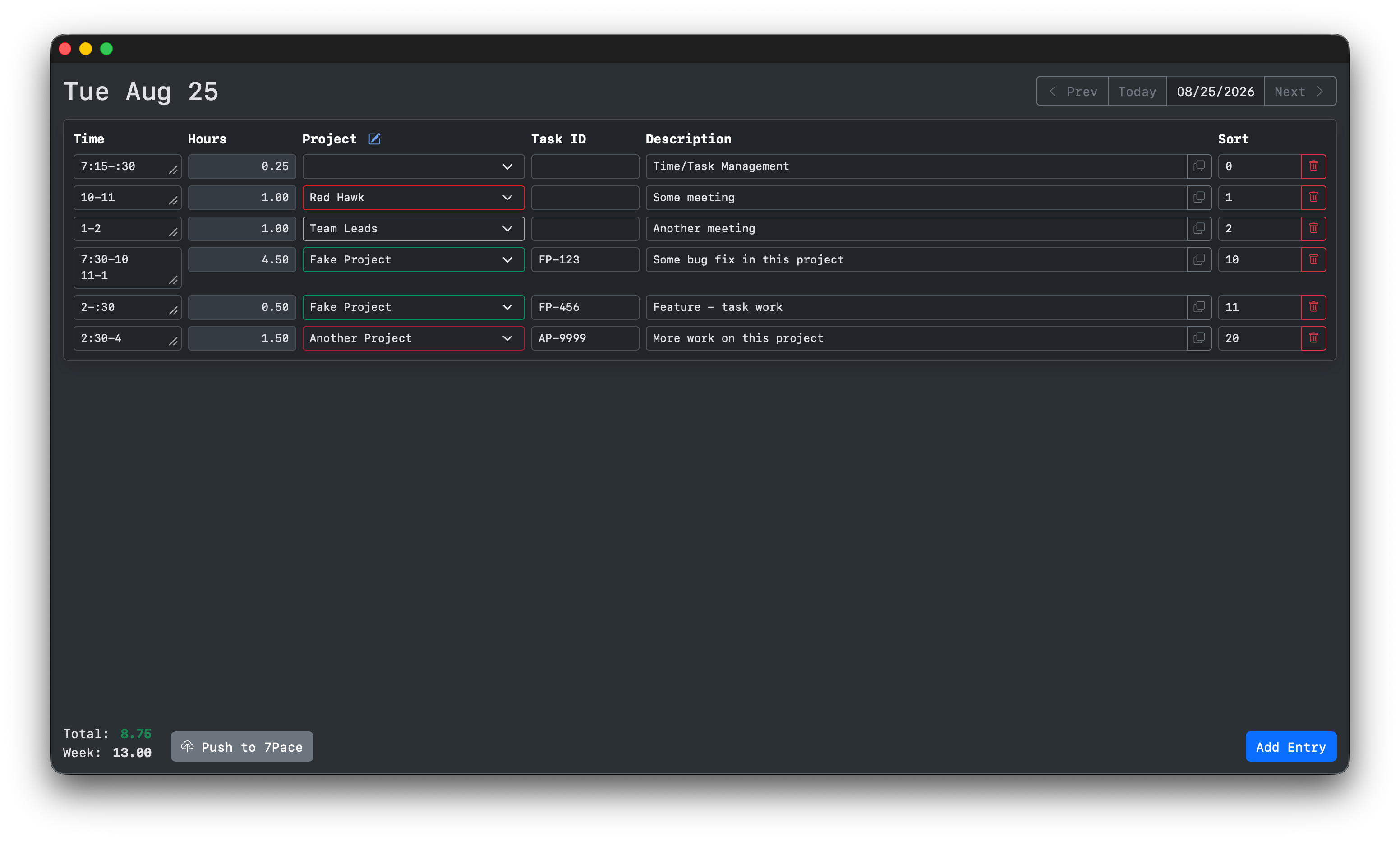
Rubato is basically that table, but in a SQLite database with a nice UI. It’s a Blazor server web app, which I run on a server in my office and only expose locally. I then load it in a standalone Safari window (using Safari’s “Add to Dock” feature). It’s got some nice features:
- Automatic time parsing, so the Hours column doesn’t need to be calculated. I have a little CLI that does this which I used in combination with Notion via copy/paste, but having this integrated is a massive win.
- Projects can be managed via the app and each can have a color which makes them stand out from each other. Any valid CSS color can be used, too.
- When I open the app in the morning, there’s a button to copy entries from the previous working day, which is a great way to get things entered fast, especially when several entries carry over.
- The sort order column is a holdover from Notion but serves an additional purpose for me. The overhead entry is always 0, meetings are 1-9, and development tasks are 10+. I then group the development tasks by project, so one project will use 10/11/12 and the next will use 20/21/22, etc.
- Entries can be cloned, which makes entering a bunch of tasks for the same project very easy.
- A day can be pushed to 7Pace, the current billing time tracking system we’re using at work.
- I get a clear running total of my hours for the day, letting me know when I’ve hit (or passed) 8 for a day and 40 for the week.
I’ve been using it for a few weeks now. It lives in the bottom portion of my secondary monitor and is always there. That’s where I’ve kept Notion for the last few years and Rubato was able to drop in to replace it pretty quickly.
The name comes from a musical tempo. Rubato translates to “robbed time” and is a marking that means that the tempo can be adjusted to be more expressive. One beat or phrase can be made a bit longer and another shorter. It’s flexible with the intention to amplify the emotion of the piece.
7Pace Push
7Pace is the time tracking system that Red Hawk uses for billing. Contract work depends on accurate time sheets, and I’ve used several of these systems over the years. 7Pace is just the most recent, and has an easy to use REST API. It also has quite a rough UI, which makes this integration so much more helpful.
Once a day is ready, the “Push to 7Pace” button will run the export. Any worklogs for that day are removed and new ones are added based on the day’s entries. A few modifications were needed to make this export work:
- Each project needs a Work Item ID. 7Pace sits on top of Azure DevOps and work is logged to work items. Our current set up maps what I consider a project to a work item, pretty much a 1:1 mapping.
- A worklog in 7Pace requires an activity type. These are groupings like “Meeting” or “Development”. My trick with the sort order means that the value of that column determines the activity type, with one exception. If the description contains “deploy” then the activity type is “Deployment”. The IDs for those activity types are in the app settings.
Claude Code
I want to be clear that I did use Claude Code to help build this app. I use Claude Code for work and think I’ve found a good balance when using it. In this case, the initial work on Rubato was all me and Claude only came in once I had a working version. Low level things like the project structure and database schema were all done by hand. When it came to features, refactoring, and fixes, I don’t ever let Claude implement things without thorough review (and usually quite a bit of editing). I consider this to be an app that I wrote while using Claude Code as a tool.
I’ve made a tool and I’ve made it very specifically for me. I’ve open-sourced it, so you’re welcome to give it a shot, but it’s certainly not something I’d recommend anyone use. I think tracking time is important (especially for my kind of work) but how you do it is a very personal choice. This is just my way.